With the free Microsoft utilities LockoutStatus and Acctinfo of the Account Lockout and Management Tools, you can quickly access a user account’s lockout status, unlock the account, and reset the password.

Source : 4sysops
Download : Microsoft’s Account Lockout and Management Tools.

Read More

Group Policy Search

Group Policy Search is a free online tool from Microsoft that allows you to find Group Policy settings easily.

When I discovered the power of the System Policies in Windows NT 4, I wondered why Microsoft didn’t offer a search tool that allows to me find all policies easily. I had to wait only 15 years until I stumbled across the Group Policy Search service.

Source : 4sysops

Read More

Microsoft released its very first official Office app for iPhone today – OneNote Mobile, which is available in the U.S. iTunes app store only and free for a limited time.

OneNote Mobile for iPhone is a note taking and organizing app. It allows you easily create and edit notes that can include text, photo and list. With automatic SkyDrive cloud sync capability, you can always keep your OneNote notes up to date on your iPhone, and access them from anywhere – your phone, your PC and browser.

Source : LiveSide.net

Read More

Ashley McGlone has a great script up for merging GPOs together through powershell.

I wish I had this script five years ago. At the time I was searching for a way to combine or merge GPOs, but there simply wasn’t a way to do it. And today there still isn’t a way to do it… until POWERSHELL! Almost every environment I see (including my own former environment) has a collection of GPOs that have evolved over time and really need to be consolidated and cleaned up.

In Windows Server 2008 R2 we released a new PowerShell module for Group Policy administration. I haven’t seen much written about it, and I don’t think many people realize it is there.

Check it out!

Source : Group Policy Team Blog

Read More

Excellent wrap-up of DFS on non-MS OS

Hi all, Ned here again. I’ve been asked a few times if other operating systems can utilize DFS Namespaces running on Windows Server. It’s a sticky wicket; as a “voice of Microsoft” my statements carry a lot of weight - deserved or not. It’s not smart or ethical for me to say that something not made by Microsoft works well, works better than something else, or doesn’t work at all. In some cases, lawyers may be summoned from Vhoorl.

Complete article : Ask the Directory Services Team

Read More

Earlier this summer I blogged about IIS Express.  IIS Express is a free version of IIS 7.5 that is optimized for developer scenarios.  We think it combines the ease of use of the ASP.NET Web Server (aka Cassini) currently built-into VS today with the full power of IIS.  Specifically:

  • It’s lightweight and easy to install (less than 5Mb download and a quick install)
  • It does not require an administrator account to run/debug applications from Visual Studio
  • It enables a full web-server feature set – including SSL, URL Rewrite, and other IIS 7.x modules
  • It supports and enables the same extensibility model and web.config file settings that IIS 7.x support
  • It can be installed side-by-side with the full IIS web server as well as the ASP.NET Development Server (they do not conflict at all)
  • It works on Windows XP and higher operating systems – giving you a full IIS 7.x developer feature-set on all Windows OS platforms

Source : weblogs.asp.net/scottgu

Read More

WSUS Offline Update - Generator

WSUS Offline Update is a free portable tool that allows you to download updates for Windows XP, Vista, Windows 7, and all Office versions and install those updates on computers with no Internet connection.

Source : 4sysops

Read More

IIS 7.5 Express is a simple and self-contained version of IIS 7.5 that is optimized for developers.

IIS 7.5 Express enhances your ability to develop and test web applications on Windows by combining the power of IIS 7.5 with the convenience of a lightweight web server like the ASP.NET Development Server (also known as Cassini). The benefits of using IIS 7.5 Express include:

  • The same web server that runs on your production server is now available on your development computer.
  • Most tasks can be done without the need for administrative privileges.
  • IIS 7.5 Express runs on Windows XP and all later versions of Windows.
  • Many users can work independently on the same computer.

Download details Internet Information Services (IIS) 7.5 Express

Source : Bink.nu

Read More

Source : Bink.nu

Read More

Microsoft also is releasing the 1.0 version of its free, open-source “Orchard” content-management system (CMS). Like WebMatrix, Orchard’s goal is to require users to do less coding, making the product appealing for a less techie audience, Microsoft is hoping.

Source : www.zdnet.com
Ref : orchardproject.net

Read More

The free Microsoft tool WSUS ClientManager allows you to add Windows workgroup computers to a WSUS server. To add multiple computers to WSUS, you can use the REG file that WSUS ClientManager creates.

Source : 4sysops.com
Download : wsusworkgroup.codeplex.com

Read More
I was recently talking with some good friends about tips for performance and what an IIS Administrator could do on the server side. I also see this question from time to time in the forums @ http://forums.iis.net . Of course, you should test individual settings in a controlled environment while performing load testing before just implementing on your production farm. IIS Compression enabled (both static and dynamic if possible, set it to 9) If you are running IIS 6, check this article out by Scott...(read more)

Source : The Official Microsoft IIS Site

Read More
Read More

This is a list of free e-books that are useful for Windows administrators. It will be regularly updated.

Source : 4sysops

Read More

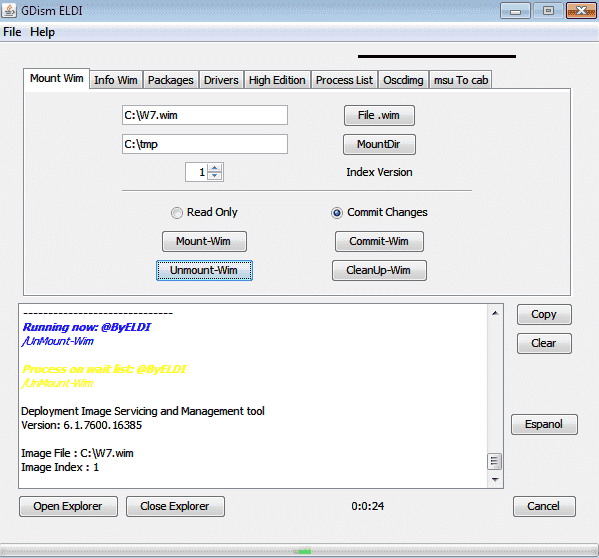
GDism ELDI is a free GUI for DISM of the WAIK (Windows Automated Installation Kit) that allows you to manage WIM images.

DISM GUI- GDism ELDI

GDism ELDI

Source : 4sysops

Read More
Read More

Organizations are always on the prowl for cost-effective storage solutions. In a number of previous posts, whenever a free storage product is mentioned, TechRepublic members frequently suggest FreeNAS as an alternative to StarWind, Openfiler and other software storage solutions. By its name, FreeNAS is a free solution. In this gallery, FreeNAS will be installed as a virtual machine and provisioned as a Windows file resource using the common internet file system (CIFS) storage protocol.

Source : TechRepublic

Read More

This week we are introducing a new Windows Live plug-ins website, which allows you to download and submit plug-ins for Windows Live Photo Gallery, Movie Maker, and Writer.

Source : Inside Windows Live

Read More

Microsoft Security Essentials, released back in September 2009 as a free replacement for the subscription-based Windows Live OneCare, has been updated to version 2.0 today. The final release carries the build number 2.0.657 and includes new features such as:

  • Windows Firewall integration – During setup, Microsoft Security Essentials will now ask if you would like to turn the Windows Firewall on or off.
  • Enhanced protection for web-based threats – Microsoft Security Essentials now integrates with Internet Explorer to provide protection against web-based threats.
  • New protection engine – The updated anti-malware engine offers enhanced detection and cleanup capabilities with better performance.
  • Network inspection system – Protection against network-based exploits is now built in to Microsoft Security Essentials.


You can download Microsoft Security Essentials 2.0 at Microsoft Download Center.

Source : LiveSide.net

Read More

I wanted to setup a virtual lab with a Microsoft Deployment Toolkit 2010 server and a PXE client in Virtual Box. I finally got it to work !

The main problem is that the Intel PRO/1000 network card in VirtualBox does not seems to work with PXE (I dont know why) and the PCnet-FAST adapter is not supported (by default) in Windows PE (and no driver available in x64).

My solution is to simply define 2 network adapters in your virtual machine (the PXE client) :

mdt-1

PXE will use the first adapter (PCnet-FAST) and Windows PE will use the Intel PRO/1000 because it doesn’t know about the other one (no driver).

Here’s a step-by-step guide :

Ensure that the boot order of you VirtualBox machine allow it the boot from the Network :

mdt2b

You should also check that APIC is ON (Windows PE wont boot without it).

Boot you virtual machine, a screen like this should appear :

MDT-3

Open your "Windows Deployment Services” (WDS) console and approve the new pending device :

mdt-4

To avoid confusion in Microsoft Deployment Toolkit (MDT) I prefer to use the Computer UID instead of the MAC address to identify the computer (because we have two network adapters). To get the Computer UID at this stage, open “Active Directory Users and Computers” and display the properties of the new Computer object that WDS created when you approved the pending device.

mdt-5

On the Remote Install tab, copy the ‘Computer’s unique ID’ without the bracelets {}.

Open the ‘Deployment Workbench’ and create a new computer in the database (Advanced Configuration)

mdt-6

Enter a description and paste the ‘Computer’s unique ID’ in the UUID field. Complete the computer configuration the match your MDT setup (Assign a role or a TaskSequenceID).

That's it, reboot your virtual machine and your deployment should start.

Note : This article does not cover all your MDT/WDS setup, you have to install and configure those by yourself before using this solution. But if you used MDT before that should not be a problem.

Read More
Next PostNewer Posts Previous PostOlder Posts Home