Sandro Villinger wrote an excellent article on speeding up boot-times, most of these articles do not go further than msconfig.exe, this article does.

Like this article talks about “MainPathBootTime”


Read the full article: What’s Taking So Long How to Fight Slow Startup Times in Windows 7 « IT Expert Voice

Source : Bink.nu

Read More

Office Web Apps are now online :

  • Word
  • Excel
  • PowerPoint
  • OneNote

You can try it for yourself at office.live.com

Read More

This is a new tool available for free from Microsoft Download.
This is a ‘must have’.

RDCMan manages multiple remote desktop connections. It is useful for managing server labs where you need regular access to each machine such as automated checkin systems and data centers. It is similar to the built-in MMC Remote Desktops snap-in, but more flexible.

From a click in a tree I can launch a Remote Desktop on any of our servers.

rdcmon-main

There is even a thumbnail view of my connections.

rdcmon-thumbs

You can set all the Remote Desktop Client parameters for each server.

rdcmon-prop

The settings in each tab can be inherited from the parent group. This mains that you can change the settings of all, or a group, of your connections in one place.

rdcmon-logoff

You can log off (or disconnect) all your connections in one click.

All the settings/groups/servers you define are store in a RDG file. You can copy this file to another computer or use it to import a list of servers.

Many thanks to Julian Burger who made this nice little tool.

Download : www.microsoft.com/downloads

Read More

I’m writing HTML pages in french with Microsoft Expression Web 3.0 (xWeb) and I can’t type certain characters like è, ê, or î. For example to produce an è you have to first hit the dead-key ` and than hit the e letter. This works everywhere except in xWeb.

A search in the Expression Web Forum showed me that I’m not the only one :

I was really disappointed to read :

The good news is that we have fixed the bug.  The bad news is that the fix is not in the service pack and will not be available until the next release.

I can’t say that I think this is really professional. Come on guys you could have done better than that. I guess we just have to hope and wait for version 4.0

In the mean time I’ve used the ‘Code snippets’ to help paste the lost characters.

Here’s how to configure and use your codes snippets for french characters :

Close Microsoft Expression Web

Open the the file C:\Users\<username>\AppData\Roaming\Microsoft\Expression\Web 3\Legacy\Expression\Web 3\Snippets\SnippetsCustom.xml

Copy the following XML, paste it in the SnippetsCustom.xml file and save it.

<?xml version="1.0"?>
<!-- Fichier de configuration des extraits de code -->
<snippets><snippet keyword="é">
		<description>é</description>
		<text>é</text>
	</snippet>
	<snippet keyword="à">
		<description>à</description>
		<text>&amp;agrave;</text>
	</snippet>
<snippet keyword="â">
		<description>â</description>
		<text>&amp;acirc;</text>
	</snippet>
<snippet keyword="Â">
		<description>Â</description>
		<text>&amp;Acirc;</text>
	</snippet>
<snippet keyword="À">
		<description>À</description>
		<text>&amp;Agrave;</text>
	</snippet>
<snippet keyword="ç">
		<description>ç</description>
		<text>&amp;ccedil;</text>
	</snippet>
<snippet keyword="Ç">
		<description>Ç</description>
		<text>&amp;Ccedil;</text>
	</snippet>
<snippet keyword="é">
		<description>é</description>
		<text>&amp;Eacute;</text>
	</snippet>
<snippet keyword="É">
		<description>É</description>
		<text>&amp;Eacute;</text>
	</snippet>
<snippet keyword="ê">
		<description>ê</description>
		<text>&amp;ecirc;</text>
	</snippet>
<snippet keyword="Ê">
		<description>Ê</description>
		<text>&amp;Ecirc;</text>
	</snippet>
<snippet keyword="Ê">
		<description>Ê</description>
		<text>&amp;Ecirc;</text>
	</snippet>
<snippet keyword="è">
		<description>è</description>
		<text>&amp;egrave;</text>
	</snippet>
<snippet keyword="È">
		<description>È</description>
		<text>&amp;Egrave;</text>
	</snippet>
<snippet keyword="ë">
		<description>ë</description>
		<text>&amp;euml;</text>
	</snippet>
<snippet keyword="Ë">
		<description>Ë</description>
		<text>&amp;Euml;</text>
	</snippet>
<snippet keyword="î">
		<description>î</description>
		<text>&amp;icirc;</text>
	</snippet>
<snippet keyword="Î">
		<description>Î</description>
		<text>&amp;Icirc;</text>
	</snippet>
<snippet keyword="ô">
		<description>ô</description>
		<text>&amp;ocirc;</text>
	</snippet>
<snippet keyword="Ô">
		<description>Ô</description>
		<text>&amp;Ocirc;</text>
	</snippet>
<snippet keyword="û">
		<description>û</description>
		<text>&amp;ucirc;</text>
	</snippet>
<snippet keyword="Û">
		<description>Û</description>
		<text>&amp;Ucirc;</text>
	</snippet>
<snippet keyword="ù">
		<description>ù</description>
		<text>&amp;ugrave;</text>
	</snippet>
<snippet keyword="Ù">
		<description>Ù</description>
		<text>&amp;Ugrave;</text>
	</snippet>
</snippets>

Open Expression Web

In the code view hit CTRL + ENTER and choose one of your new snippets.
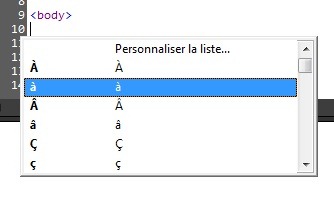
xWebCodeSnippets

Read More

Here are some tools that can help you to check to security settings (privacy) in Facebook :

Profile Watch

Get your “privacy score” and check what everyone can see on you Facebook profile

Reclaim privacy

Get a detailed scan of your Facebook profile and see what needs you attention.

Openbook

Search Facebook update from peoples that left their privacy settings open for everyone

Check how your friends sees your profile

This one is built in Facebook :

  1. Logon to Facebook
  2. Click on this link
Read More

Blackbird auditor express is a free and easy-to-use version of Blackbird auditor. This community version offers real-time change monitoring for organizations with basic Active Directory (AD) auditing needs.

Source : 4sysops

Read More

With this web site you can get your “privacy score” and check what everyone can see on your Facebook profile.

Link : http://www.profilewatch.org

Read More

This page contains resources to help you with capacity management in your Microsoft SharePoint Server 2010 environment—map your solution design to a farm size and set of hardware that supports your business goals.

Additional content is under development. Check back for new and updated content.


Source : SharePoint Server 2010 > Resource Centers

Read More

Hi, I’m Alex Payne and I’m a Director in our Online Product Management team. A couple of news articles and blogs landed today where Google is trying to make the case that existing Office customers (and there are over 500 Million of them worldwide) should hold off on upgrading to Office 2010 and instead utilize Google Docs as a complement to older versions of Office.

This just isn’t the case.

Source : blogs.technet.com/whymicrosoft

Also interesting : Forrester: Google still a distant Office competitor

Read More

If you own a Scientific Atlanta HDTV recorder (Explorer 8300HD), here’s a few tips you might find interesting.

Tips From Enter
Enter diagnostic mode Front of unit Press and hold SELECT until the Mail LED lights,
then press INFO
Enter diagnostic mode Remote control Press and hold PAUSE until the Mail LED lights,
then press PAGE UP (+)
Reboot Front of unit Press and hold VOL+ and VOL-, then press INFO
Reboot Remote control Press and hold PAUSE until the Mail LED lights,
then press PAGE DOWN (-)
Change diagnostic window transparency Front of unit While in diagnostic mode, press SELECT
Change diagnostic window transparency Remote control While in diagnostic mode, press B
Format hard drive Remote control Press and hold PAUSE until the Mail LED lights, then press LIST three times, the unit will format the drive and reboot

I hope I do not have to tell you not to try the “format hard drive” tips unless you really want to do this and loose all your recordings.

Source : www.digitalhome.ca and Videotron technical support.

Read More

Softinventive Lab Total Network Monitor is a sophisticated free monitoring solution that supports numerous probe types based on HTTP, FTP, Event Log, Service State, Registry, log files, and more. The tool has only been released recently as freeware. There is no doubt that Total Network Monitor (TNM) is one of the best free monitoring solutions.

network-monitoring Screenshot

Source : 4sysops.com

Read More

PasswordAssitant

Password Assistant is a GUI application that lets you update passwords of user accounts on multiple Windows NT, Windows 2000 or Windows XP machines. A good example is updating the Administrator password on all of your workstations.

You can obtain computer names to update from the network neighborhood (with a filter option) or from a text file. The update process can also be logged to a text file.

It’s free as in free beer !

Source : NTToolkit From netikus.net

Read More

When I’m writing my e-mail message to my Mom, I go to the Insert tab, click the Screenshot icon, and then click Screen Clipping.
image

source : Sending screenshots

Read More

87915_strip_print

Read More

MSFixitOL7a

Microsoft has announced the Microsoft Fix it Online Portal. Microsoft Fix it Center makes getting support easier than ever because automatic troubleshooters solve the issues you have now and prevent new ones

As easy as "Click, click, fixed!"

Source : Bink.nu

Read More

One of the applications included with the Microsoft Desktop Optimization Pack (MDOP) is DART, which is made up of tools previously available through the Winternals Administrator's Pak.

Source : www.windowsitpro.com
  technet.microsoft.com
Read More

From time to time people have asked me how to install Virtual Server on Windows 7, and have even pointed me towards attempts made by other people with varying levels of success.  But I have not looked into this until today – because it is unsupported. 

Source : Virtual PC Guy's WebLog

Read More

When we looked into how people used email, we found some interesting patterns. It turns out that there are generally three types of people when it comes to email: pilers, filers, and purgers.

Which are you?

  • Piler: “I generally don’t put email into a folder or archive. I don’t delete it. I just let it pile up in my inbox."
  • Filer: “I generally categorize messages by moving them into folders I’ve created or assigning labels to each message.”
  • Purger:  “I generally delete email after I’ve read it.”

Source : Inside Windows Live

Read More

Microsoft Security Essentials antimalware definitions are now available via WSUS.

Source : blogs.technet.com/wsus

Read More
Next PostNewer Posts Previous PostOlder Posts Home
